

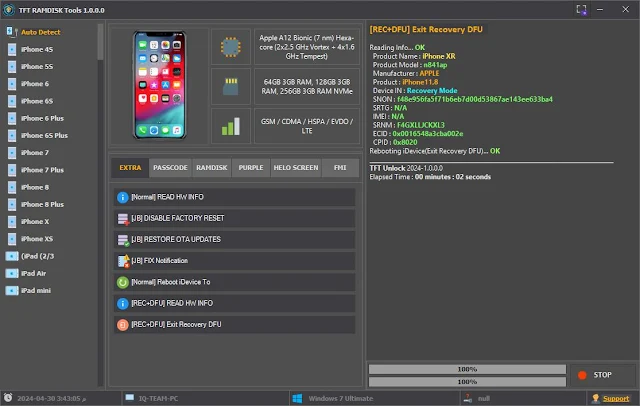
🛠️ TFT RAMDISK Tools v1.0.0.0 Beta
TFT Ramdisk Tool V1.0 is a specialized Windows-based iOS servicing utility designed for iPhones and iPads that are stuck on the Hello Screen or in a Passcode / Disabled state. This tool is part of the popular TFT Team software suite (such as TFT Unlocker).
The tool boots the device into Ramdisk mode, allowing system-level administrative tasks to be performed.
⚙️ Core Functions & Features
Passcode / Disabled Bypass
- 🔓 iCloud Bypass (Hello Screen): Bypasses Activation Lock on supported devices to provide access to the Home Screen.
- 🔐 Passcode / Disabled Bypass: Performs passcode backup → device erase → passcode restore with signal support.
- 🟣 DFU to Purple Mode: Used to modify the Serial Number, Bluetooth, and Wi-Fi addresses.
- 🏢 MDM Bypass: Removes Corporate or School MDM restrictions.
- 📋 Read Device Info: Extracts hardware and software details in Recovery / DFU mode.
📱 Hardware & iOS Compatibility
iOS 12 to iOS 16 / 17
- 🧠 Exploit Used: checkm8 vulnerability
- 📲 Supported iPhones: iPhone 6s → iPhone X
- 📟 Supported iPads: A8 to A11 chip–based models
- 📀 iOS Versions: iOS 12 to iOS 16 / 17 (depends on tool updates)
💻 Usage Requirements
Windows 10 / Windows 11
- 🖥️ Operating System: Windows 10 / Windows 11
- 🔌 Cable: USB-A to Lightning (USB-C cables may fail in DFU mode)
- 🧩 Drivers: LibUSB-Win32 + Apple iTunes Drivers must be installed
⚠️ Important Considerations (Disclaimer)
No Signal Risk
- 🛡️ Security Warning: Antivirus software may flag this tool as malware (exploit-based).
- ⚖️ Legal Use Only: Use only on devices you personally own. Using it on stolen devices is illegal.
- 📡 No Signal Risk: After iCloud bypass, there may be no signal if the IMEI is blacklisted.
- 💥 Data Loss: Most operations will fully wipe the device.
🔓 Hello Screen (Activation Lock) Bypass – TFT Ramdisk Tool V1.0
DFU Mode
Using TFT Ramdisk Tool V1.0, bypassing the Hello Screen (Activation Lock) is a multi-step process that requires putting the device into DFU Mode and booting a custom Ramdisk.
⚠️ Pre-Check Requirements
USB-C cables are unreliable
- 📱 Supported Devices: iPhone 6s → iPhone X (A8–A11)
- 💾 Backup: This process will completely wipe all data
- 🧩 Drivers: Zadig / LibUSB-Win32 (WinUSB replacement required)
- 🔌 Stable Cable: USB-A to Lightning (USB-C cables are unreliable)
🔧 Step 1: Device Preparation (DFU Mode)
Connect the iPhone to the PC and put it into DFU Mode:
- 📲 iPhone 8 / X:
- ➡️ Press Volume Up (release)
- ➡️ Press Volume Down (release)
- ➡️ Hold the Side Button until the screen turns black
- ➡️ Hold Side + Volume Down for 5 seconds
- ➡️ Release the Side Button, keep holding Volume Down
🟣 Step 2: PwnDFU (Exploit)
In this step, the device is placed into PwnDFU mode using the checkm8 exploit, which allows unsigned code execution required for ramdisk booting.
TFT Ramdisk Tool
- 🖥️ Open the TFT Ramdisk Tool
- ⚙️ Select the Options / PwnDFU tab
- ▶️ Click on Run Gaster / PwnDFU
-
✅ Upon success, you will see the message:
“Device is now PwnDFU”
💽 Step 3: Boot Ramdisk
After successfully entering PwnDFU mode, a custom Ramdisk is booted. This provides temporary system-level access required for bypass operations.
iPhone screen verbose boot
- 📂 Open the Ramdisk tab
- 📀 Select your iOS version (15.x / 16.x)
- 🚀 Click on Boot Ramdisk
- 📜 You will see scrolling code on the iPhone screen (verbose boot), indicating the ramdisk is loading
🔓 Step 4: Hello Screen Bypass
In this step, the actual Hello Screen (Activation Lock) bypass is performed using SSH access through the booted ramdisk.
Hello Screen Activation Lock
- 🔌 Click on Check SSH (to verify the connection)
- 🟢 Select Hello Bypass / Bypass iCloud
- ⏳ Wait for the process to complete
- 🔁 The device will reboot automatically
🚫 Important Limitations
The following limitations apply after performing the Hello Screen bypass:
SIM / Signal
| Feature | Status | Reason |
|---|---|---|
| 📡 SIM / Signal | ❌ No | Baseband token is not fixed |
| ☁️ iCloud Login | ✅ Partial | App Store login is possible, Settings access is limited |
| 🔁 Reboot | ⚠️ Untethered | Bypass remains active after reboot |
| ⬆️ OTA Update | ❌ Disabled | Updating will relock the device |
🛠️ Troubleshooting Common Errors
If you encounter issues during the process, check the solutions below:
Stuck on Sending Ramdisk
-
❌ Device Not Found:
Check drivers in Device Manager (Apple Mobile Device / libusb-win32) -
⏳ Stuck on Sending Ramdisk:
Possible cable or USB port issue – try a USB 2.0 port -
🚫 Mount Failed:
Make sure the correct iOS version is selected
👋 Hello Screen
MEID / No Signal / GSM
- 🔓 Untethered Bypass [MEID] (No Signal)
- 📡 Untethered Bypass [GSM]
- 🕵️ Hidden iCloud
- 🎭 Fake iOS Version
- ♻️ Restore iOS Version
🧩 Extra
Reboot | Shutdown | Recovery
- ℹ️ [Normal] Read Info
- 🙈 [JB] Hide Software Update / Erase All Content
- 🔄 [JB] Restore OTA Update
- 🔔 [JB] Fix Notifications
- 🔁 [Normal] Reboot iDevice (Reboot | Shutdown | Recovery)
- 🧠 [REC + DFU] Read Hardware Info
- 🚪 [REC + DFU] Exit Recovery / DFU Mode
🔐 Passcode
Backup Passcode
- 💾 Backup Passcode (Full)
- 🧹 Erase All Content & Settings
- 📂 Restore Backup
💽 Ramdisk
Bypass Hello Screen
- ✅ Get Activation [Change SN]
- 🚫 Bypass Hello Screen
- 🛠️ [iPWNDFU] Fix Mount
- 🟣 [iPWNDFU] Boot Purple Mode
🟪 Purple
Serial / Bluetooth / Wi-Fi / Ethernet
- ✍️ Write (Serial | Bluetooth | Wi-Fi | Ethernet)
- 📊 [DIAG] Read Hardware Info
- 📄 [DIAG] Read Device Info
- 📶 [DIAG] Unlock Wi-Fi
👉 Please Support Us 👍Subscribe OUR YouTube Channel ❤️
While we strive to provide working and tested files, we do not take any responsibility for any damage to your device during the process. Please proceed at your own risk and ensure you have a backup of your data before flashing or installing any software.
⬇️ Download Section
🌟 Why Choose Us?
Our goal is to provide you with authentic and fully tested files. We make
technology easy for everyone—whether you are a beginner or a professional
Mobile/PC technician.
🚀 Daily Updates
We update our library daily to ensure you always get the latest tools and
software.
🛡️ Safe and Secure
Your data and device safety are our top priority. All files are virus-free and
thoroughly scanned.
⚡ Fast Download Speed
We use premium servers to save your time and ensure quick and smooth
downloads.
🛠️ Expert Support
Providing files is not enough—we also offer proper usage guides and
step-by-step instructions.
✅ 100% Working Links
All our links are active and functional. If any link has an issue, our team
fixes it immediately.
❤️ Also Take a Look at These
Use at your own risk. Recommended for professional or advanced users only.
🛠️ TFT Unlock Tools (Latest Collection) Servar 1
All TFT tools are tested and working. Use the same password for all files.
-
🔓 TFT Unlock Tool v6.2.1.1
📦 Size: 302 MB
🔗 Download -
💻 TFT Unlocker Digital v1.5.7.7
📦 Size: 147 MB
🔗 Download -
📱 TFT MTP Bypass Tool V5.0.0 Pro
📦 Size: 24 MB
🔗 Download -
🍏 TFT RAMDISK Tools v1.0.0.0 Beta
📦 Size: 104 MB
🔗 Download
🔑 TFT Tools Password: TFT
⚠️ Antivirus temporarily disable karein | ✅ Files virus‑free
🛠️ TFT Unlock Tools (Latest Collection) Servar 2
All TFT tools are tested and working. Use the same password for all files.
-
🔓 TFT Unlock Tool v6.2.1.1
📦 Size: 302 MB
🔗 Download -
💻 TFT Unlocker Digital v1.5.7.7
📦 Size: 147 MB
🔗 Download -
📱 TFT MTP Bypass Tool V5.0.0 Pro
📦 Size: 24 MB
🔗 Download -
🍏 TFT RAMDISK Tools v1.0.0.0 Beta
📦 Size: 104 MB
🔗 Download
🔑 TFT Tools Password: TFT
⚠️ Antivirus temporarily disable karein | ✅ Files virus‑free
🛠️ TFT Unlock Tools (Latest Collection) Servar 2
All TFT tools are tested and working. Use the same password for all files.
-
🔓 TFT Unlock Tool v6.2.1.1
📦 Size: 302 MB
🔗 Download -
💻 TFT Unlocker Digital v1.5.7.7
📦 Size: 147 MB
🔗 Download -
📱 TFT MTP Bypass Tool V5.0.0 Pro
📦 Size: 24 MB
🔗 Download -
🍏 TFT RAMDISK Tools v1.0.0.0 Beta
📦 Size: 104 MB
🔗 Download
🔑 TFT Tools Password: TFT
⚠️ Antivirus temporarily disable karein | ✅ Files virus‑free
