

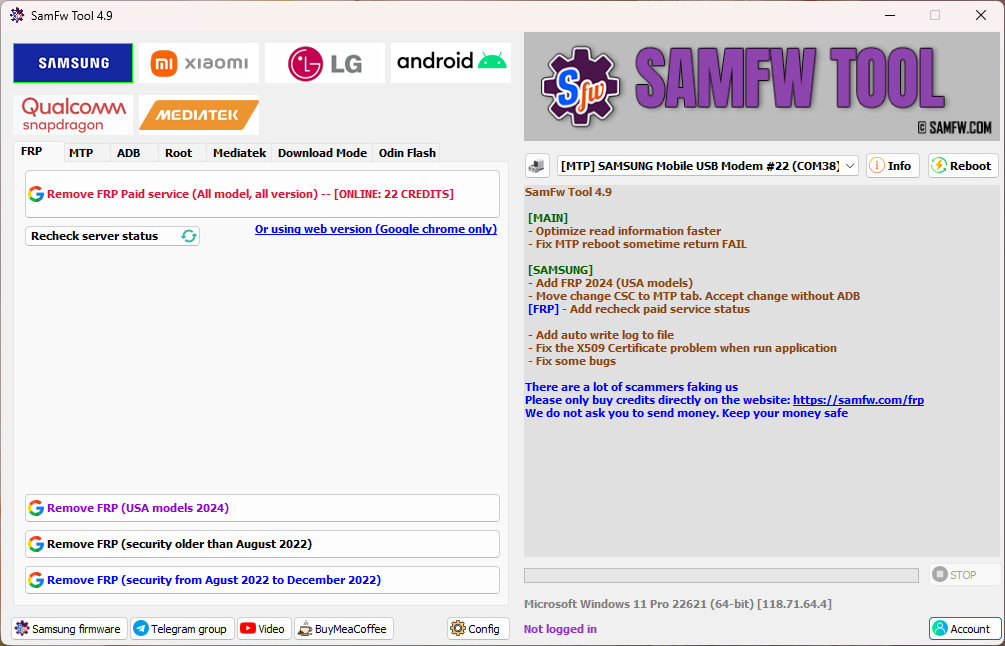
SamFw Tool 4.9 - Samsung - Xiaomi - LG - Android - Qualcomm - SPD - MTK
SamFw Tool 4.9
[MAIN]
- Optimize read information speed
- Fix MTP reboot issue (sometimes returns FAIL)
[SAMSUNG]
- Add FRP 2024 (USA models)
- Move Change CSC to MTP tab (Accept change without ADB)
[FRP]
- Add recheck paid service status
Other Improvements
- Add auto write log to file
- Fix X509 Certificate issue when running the application
- Fix some bugs
SamFw Tool 4.8.1
[SAMSUNG]
- Add KG Unlock (Untested)
- Hide tool to tray bar on close (No need to check update every run)
- Add direct login in tool
- Fix check update error for some users
- Fix paid service unlock bugs
- Fix API connection error
- Fix Change CSC error
- Fix some bugs
Remove FRP with One Click
- Connect the phone to PC and install Samsung USB Driver
- Go to Emergency Call and dial *#0*#
- Click Remove FRP in the tool
- Accept USB Debugging on phone if prompted
- Phone will complete the process and reboot
Samsung
- Remove FRP
- Remove FRP (New Security)
- Remove FRP 2024 (USA Models)
MTP Mode
- Factory Reset (Test Mode)
- Disable Knox (Test Mode)
- Disable Factory Mode
- KG Unlock (Untested)
- Factory Reset
- Enable Secret Code (Verizon)
ADB Mode
- Change CSC
- Change SN (Beta)
- Remove Samsung Account (Settings only, not locked state)
- Enable Mobile Data Toggle (Some AT&T Devices)
- Change CSC (Root Mode)
Download Mode
- Exit Download Mode
- Soft Brick Fix
- FRP Android 5/6 (Limited Models)
Odin Flash
- Save Recent Flash Files
- Auto Detect File & Select Slot
- Auto Extract ZIP Files
- Ignore MD5 Checksum
Misc
- Check Driver Signature Status
- Enable / Disable Driver Signature Enforcement
- Install Samsung USB Driver
- Install VC++ 2015 (ADB Support)
Xiaomi
- ADB
- MiCloud Utility (Android 8.1)
- Enable Diag Mode (Root)
Fastboot
- Remove FRP (Unlocked Devices)
Sideload
- Factory Reset
- Remove FRP
- Reset MiCloud
- Bypass MiCloud Clock (Qualcomm)
- Remove MiCloud Clock Bypass
- Read Offline MiCloud Information
EDL 9008
- Factory Reset
- Reset FRP
- Reset MiCloud
LG
- MTP
- Factory Reset
EDL (Supported Models: G7, G8, G8X, G8S, V30, V40, V50, V50S, Q6, G5, G6, V20, V35, V60)
- Factory Reset
- Remove FRP
LG UP
- Flash LG KDZ Firmware
Android
- ADB
- Battery Information
- Enable / Disable OTA Updates
- Set Language
- Factory Reset
- Hide Developer Options
FRP
- Open Browser (FRP)
- Remove FRP
App Manager
- Manage Applications (Remove, Disable, Enable, Clear Data)
- Install APK / XAPK
- Install Apps on Dual Messenger
- Remove Bloatware (KR / JP / US Variants)
ROOT
- Remove Screen Lock (Root Required)
Qualcomm
- EDL 9008 Partition Manager (Read / Write / Erase)
- Reset FRP, Factory Reset, Erase User Data
Mediatek
- Factory Reset
- Format User Data
- Remove FRP
- Unlock Bootloader
- Relock Bootloader
- Bypass Auth
👉 Please Support Us ❤️ Subscribe OUR YouTube Channel 👍
Disclaimer: Shakeel File, Guarantee that the Mobile/Pc Apps, Firmware, Flash Tools, Software or any other files on this page are 100% correct But use "At your own risk".
Download-Section:
Also Take a Look at These
SamFw Tool 4.9
DownloadNote: I hope you enjoy this article. Please do share this article. And if you are facing problem in any section or you have any question then ask us in comment box or you can Contact Us. Thank you!

